
DIGITAL INVESTIGATIONS NEWS LETTER | 22nd OCTOBER 2026
RF, Bluetooth & Wi-Fi Scanning: Finding the Devices Investigators Cannot See
A concealed camera. An unknown handset. A Bluetooth tracker. A device that never appears in a router log. Could a quick wireless survey reveal the next investigative opportunity?
Low-cost software and handheld detectors can help investigators locate signals, identify network-connected equipment and prioritise searches. No single tool can identify every device: combining methods, documenting findings and corroborating results is essential.
THE GOLDEN HOUR: SURVEY BEFORE SIGNALS DISAPPEAR
Record the scene and obtain appropriate authority before scanning. Nearby devices may move, sleep, rotate identifiers or stop transmitting; Wi-Fi access points and Bluetooth advertisements may be fleeting. Document time, position, device settings, signal readings and any changes caused by the examination.
WINDOWS & SMARTPHONE SOFTWARE
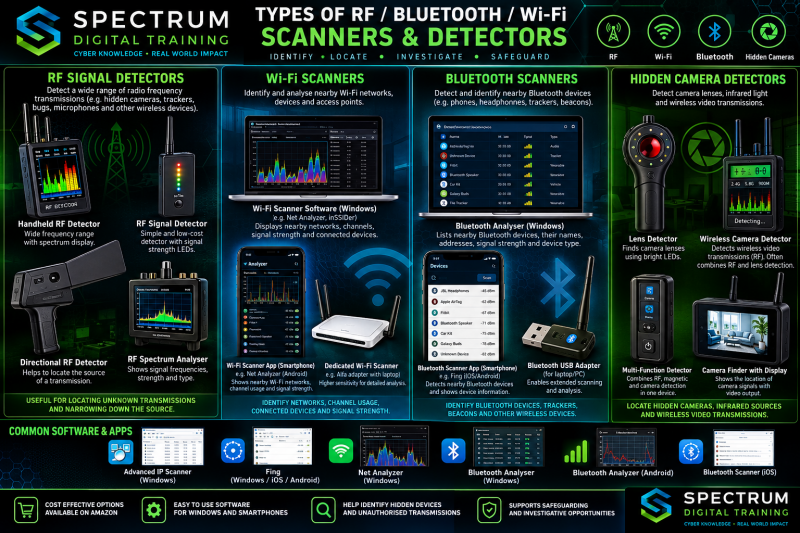
Advanced IP Scanner — Windows
A free IPv4 network scanner that can identify responding hosts, IP addresses, hostnames and MAC/manufacturer information where obtainable. Useful for locating computers, printers, network storage and other accessible LAN devices. It requires network access; it does not discover all nearby Wi-Fi radios or provide physical distance.
Fing — Android, iOS and desktop offerings
Network discovery and inventory tools can display connected devices, addresses and vendor clues on a network you are authorised to examine. Features vary by platform and subscription. Compare scans against router DHCP/client lists to identify discrepancies and devices requiring further examination.
Network Analyzer / Net Analyzer — smartphone apps
Depending on the specific app and OS permissions, tools offer LAN discovery, ping, traceroute, DNS and network configuration information. Useful for documenting gateways, subnets and reachable hosts. iOS and Android restrictions can limit access to MAC addresses and other low-level network details.
Bluetooth analyzers — Windows, Android and iOS
Examples include Bluetooth LE Explorer or compatible BLE utilities on Windows, and nRF Connect or BLE scanner apps on smartphones. They can show discoverable/advertising BLE devices, service UUIDs, names when broadcast and signal strength (RSSI). Classic Bluetooth devices and non-advertising devices may not appear; pairing or reading protected characteristics requires additional authority and support.
Wi-Fi surveying apps
Wi-Fi Analyzer-type apps, Acrylic Wi-Fi or compatible Windows surveying software can show visible SSIDs, BSSIDs, channels, bands and received signal strength. Some features require supported wireless adapters. Hidden SSIDs may still produce identifiable radio traffic, but not all devices can be identified and a detected access point is not necessarily inside the premises.
Broadband RF detectors — often sold as “bug detectors”
A handheld RF meter may react to nearby active transmitters such as cellular, Wi-Fi or Bluetooth equipment within its supported frequency range. Sweep slowly, change orientation and compare readings with known transmitters switched off where safe. These meters usually cannot identify the protocol, distinguish reflections or find a switched-off recorder. Strong nearby mobile or router signals can cause false positives.
USB Wi-Fi adapters and handheld Wi-Fi analyzers
Low-cost dual-band USB adapters with compatible software can survey 2.4/5 GHz networks; 6 GHz requires explicit hardware/driver support. Dedicated handheld analyzers can show channels and signal levels. A directional antenna may help narrow a search area, but RSSI alone cannot reliably calculate distance in metres or centimetres.
Bluetooth LE USB dongles and portable BLE scanners
A supported BLE dongle paired with Windows scanning software can discover advertising devices and record changing RSSI. Phones can do similar work with BLE scanner apps. Some specialist sniffers capture selected BLE packets, but ordinary USB adapters do not automatically decode all nearby conversations. Randomised identifiers and intermittent advertising complicate tracking.
Hidden camera detectors: optical and RF approaches
Optical lens finders use a ring of lights and a viewing filter to make reflective lenses glint; scan from several angles in low ambient light. RF detectors can react to wireless video transmissions but cannot reveal offline cameras or wired recorders. Infrared illumination tests using a phone camera are unreliable across devices; some cameras filter IR. Physical inspection remains important.
Low cost procurement checklist
- Confirm supported bands: 2.4 GHz, 5 GHz, 6 GHz, cellular or BLE as relevant; “wideband” advertising is not proof of performance.
- Check Windows/Android/iOS compatibility, drivers, app permissions, export formats, battery life and whether antennas are replaceable.
- Prefer tools that preserve time-stamped observations, screenshots or CSV exports; record model, firmware and calibration/verification checks.
WHERE SCANNING MAY HELP AN INVESTIGATION
- Locate an unknown network-connected device by comparing active scans with router inventories, physical exhibits and witness accounts.
- Look for BLE trackers, wearables, smart-home accessories and advertising sensors during a proportionate scene survey.
- Map Wi-Fi access points, extenders, guest networks and hotspots to identify further devices or records to preserve.
- Screen rooms, vehicles and accommodation for possible active RF sources or concealed optical lenses, then refer suspected devices for specialist examination.
- Repeat measurements from documented positions to identify areas warranting physical search; do not present RSSI as a precise range measurement.
A PRACTICAL SCENE WORKFLOW
- Plan: define the lawful purpose, scope, safety risks and devices to be examined. Consider specialist support for covert, evidential or interference-sensitive environments.
- Baseline: photograph the scene and record time, locations, equipment, software versions and existing Wi-Fi/Bluetooth/RF environment.
- Survey: carry out passive discovery first where feasible; use active LAN scanning only when authorised and appropriate. Note that scanning itself can change network logs.
- Correlate: compare observations with router logs, DHCP leases, device examinations, CCTV, location records and account data.
- Preserve: export original results, retain screenshots, record clock offsets, hash files where practical and explain any uncertainty in reports.
IMPORTANT EVIDENTIAL LIMITATIONS
A detected signal does not prove a device is within the room, who owns it or who operated it. RSSI is affected by walls, reflections, antenna orientation, body shielding and transmit power. BLE MAC addresses may rotate; Wi-Fi clients may randomise addresses; sleeping or powered-off devices may be invisible. Cheap RF meters can produce false alarms and cannot conclusively clear a location of hidden equipment.
THE KEY MESSAGE
RF, Bluetooth and Wi-Fi scanning can provide rapid, affordable leads that traditional device examinations may miss. Use them as complementary investigative techniques—not as standalone proof. The earlier a properly documented survey is considered, the greater the chance of capturing transient wireless opportunities.
Make sure you test hardware / software in suitable environments to build up confidence in the device / software and understand any limitations. Shop around there are lots of devices that perform similar functions and the most expensive is not ordinarily the best.
Neil Greenough | Spectrum Digital Training Ltd ©
.


Spectrum Digital Training Ltd - Digital News Letter Page - Digitally Facilitated Searches - October 2026
Stay informed with our monthly technology news updates, covering emerging technologies, digital investigative opportunities and the latest developments relevant to law enforcement and safeguarding professionals.